Hello, it's been a while! I promise we haven't been ghosting you...
The truth is we've been very busy and as always the HubSpot updates keep coming, so now we're going to refresh and recap on all the updates that have come out in June so far.
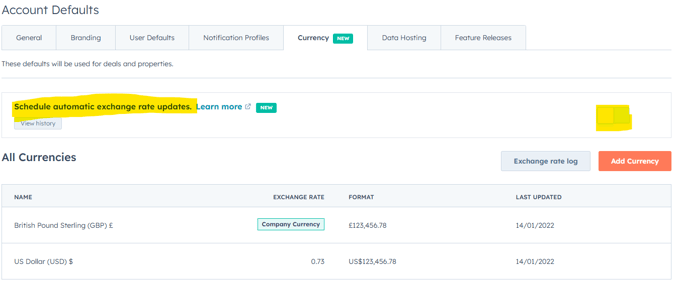
Exchange rates are always changing and it's easy to forget to update them, leading to some awry looking reporting!
Therefore this update allowing for automatic exchange rate updates has got to be one of my favourites. Out of sight and out of mind means a bit more breathing room 🌿.
For those with super admin permissions, you can turn this on via a toggle under the currency tab.
Unmatched insights: This will be great for any business using multiple currencies as it helps reduce unnecessary friction.
Who gets it: Starter Customer Platform, Professional Customer Platform, Enterprise Customer Platform, Content Starter, Content Pro, Content Enterprise, Marketing Starter, Marketing Pro, Marketing Enterprise, Ops Starter, Ops Pro, Ops Enterprise, Sales Starter, Sales Pro, Sales Enterprise, Service Starter, Service Pro, Service Enterprise
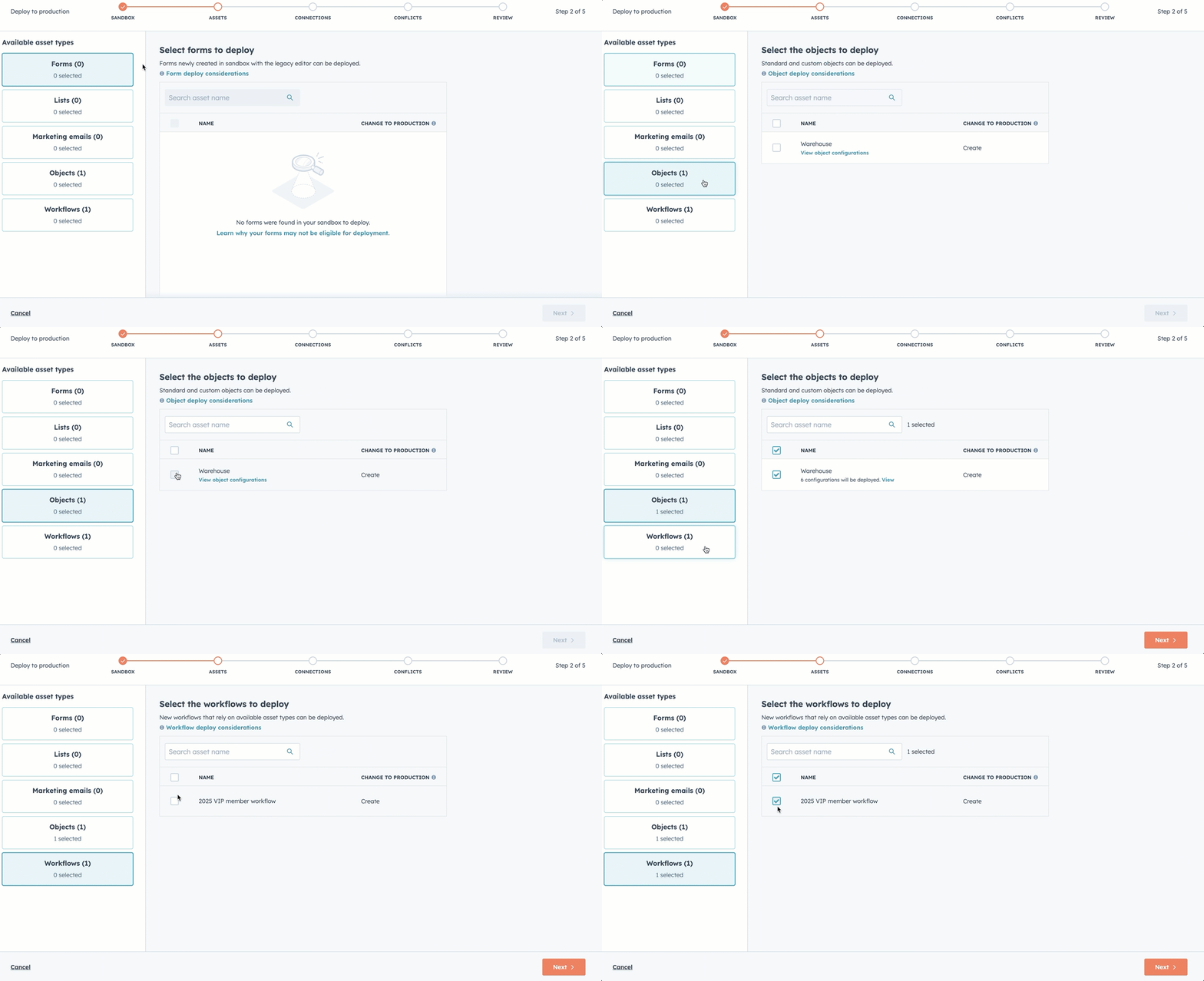
2.New Standard Sandbox with improved production metadata & deploy to production supported assets
Sandboxes are a great way to trial-run processes in a controlled environment where live data isn't going to be affected until it's ready to roll out.
The only drawback is having to then recreate those potentially complicated processes in the live environment.
That's where 'deploy to production' comes in to save you a good chunk of time.
Unmatched Insights: Safely deploy portal changes whilst allowing your users the opportunity to interact with portal changes and real data.
Who gets it: Customers who have any of the following enterprise hubs: Enterprise Customer Platform, Content Enterprise, Marketing Enterprise, Ops Enterprise, Sales Enterprise, Service Enterprise
3. View Marketing Event History with the New Registrant Card in Contact Records
You can now view all marketing event participation directly in contact records with the new registrant CRM card. Instantly see registration status, attendance, and engagement, whether events are synced from popular platforms or created in HubSpot. All on the right-hand side of your contact record.
Just open a contact record to find a panel listing their event history, with key details in one place.
Unmatched insights: When navigating multiple records it's always beneficial to have key record information readily available and there's no need to be afraid of bloat provided the information is valuable.
Who gets it: All customers using the native Marketing Events CRM object.
4.Making Hashtag management easier: New Hashtag Bank in the Social Editor
Introducing the Hashtag Bank in Social composer:
- Save and reuse your favourite hashtags
- Filter, add, and remove hashtags quickly
- Auto-detects hashtags already in your post
- Preserves hashtag capitalisation
This streamlines hashtag management, saving time and reducing errors. Access it in the Social composer by typing "#".
Unmatched insights: When you settle on a hashtag that boosts the performance of your posts, it's a good idea to hold onto it and make it readily available!
Who gets it: Professional Customer Platform, Enterprise Customer Platform, Marketing Pro, Marketing Enterprise, Marketing+ Pro, Marketing+ Enterprise
5. URL Property
URLs are now supported as a property type in the CRM. Use them to store and share website links right on your records—fields auto-format and display as clickable links. You can set allowed domains, and URLs are validated as you enter them. Note: Not yet available in Forms.
Unmatched insights: This property type means that previous single-line text fields can be retired and replaced for this specific use property allowing for better formatting.
Who gets it: All hubs and tiers
6.Breeze Social Media Agent
Meet the Social Media Agent: AI-driven content creation for tailored, effective posts across all your channels. Generate, personalise, and review post suggestions in seconds—complete with recommended post times and network-specific captions. Access via “Create with AI” or the Social tab, set your preferences, and publish or edit posts directly—streamlining your entire social workflow.
Prepare to save time and improve your social content!
Unmatched insights: HubSpot's AI started off with a heavy content-creation focus which is being developed alongside the ability to now analyse post performance and even go one step further and suggest post ideas based on your industry.
Who gets it: Marketing Pro, Marketing Enterprise
7. Custom Times and “Prevent Skip” for Forms/CTAs Now in Professional
Professional users can now set custom times for CTAs and forms on HubSpot-hosted videos and prevent viewers from skipping them (yes you can now be that annoying!). Just select your CTA or form in the video module, adjust the display time, and choose whether viewers can skip. ( FYI: Previously, these features were only available to Enterprise users)
Unmatched insights: You can now force site visitors to fill out forms or take desired CTA actions. This could be especially useful for those with gated content.
Who gets it: Professional Customer Platform, Enterprise Customer Platform, Content Pro, Content Enterprise, Marketing Pro, Marketing Enterprise, Service Pro, Service Enterprise
8.Public Beta - Email Custom Properties: Enhanced Organization and Reporting
Organise emails with custom properties for flexible categorisation, clear views, and tailored reporting. Create or select properties in the “Organize” tab, then use them to analyse campaign results more efficiently. No more messy naming systems or manual tracking.
Unmatched insights: This allows you to categorise and filter emails with tailored fields making segmentation and organisation easier.
Who gets it: Marketing Hub Pro & Enterprise customers.
1. Deal Metrics Customisation
I'm sure all sales users will recognise this bar:
The one above your deals with default analytics.
We would get people asking to customise this as the data wasn't showing them anything useful and was just taking up valuable screen real estate.
Now you can easily clone any of the default views - or create your own - hit the cog icon and get to customising so you can see useful and relevant information.
Unmatched insights: If you don't want the deal metrics you can always clone the view and remove it to ensure this doesn't show up by default.
Who gets it: Sales Pro, Sales Enterprise
2.Kanban Board for Deals Now in Sales Workspace
The Deals Kanban board is now in Sales Workspace. Visually track and manage deals by pipeline stage—no more leaving the workspace. Switch between table and Kanban views, and easily drag and drop deals through each stage. Currently in private beta; future updates will add more features.
Unmatched insights: Great for those who prefer a more visual overview of their deals and want to physically progress them along.
Who gets it:
Sales Hub Professional, Sales Hub Enterprise
3.Two Way Invoice Sync for Xero
You can now sync invoices and payments both ways between HubSpot and Xero.
Set up contact and product syncs first, then enable invoice sync to keep records up to date across both platforms. Only finalised invoices created after sync setup will flow from HubSpot to Xero, and any updates or payments will sync automatically. Filters prevent duplicate data, and unmapped line items will be added as “Custom Line Items” in Xero.
Unmatched insights: This is really valuable for businesses looking to ensure HubSpot and Xero remain in sync to display a true picture of their finances.
Who gets it: All hubs and tiers, Commerce Hub
4. Line Item Revenue Reports
Is this the afterlife? Am I in Heaven?
Historically, reporting on recurring revenue has been akin to getting blood from a stone and at the end of the day it's important to know how much revenue you're generating for your efforts.
Now with Line Item Revenue Reports you can track revenue from deal line items using billing start dates, not just deal close dates.
This allows accurate forecasting, product-level insights, and clear visibility into both closed and open recurring revenue.
Access these reports in Sales Analytics to monitor monthly recurring revenue distributed across each billing period.
Unmatched insights: This is invaluable for campaign reporting!
Who gets it: This feature is available for HubSpot Sales Hub Professional and Enterprise users.
1.Delta Changes on the Help Desk Summary Tab
The Help Desk Summary Tab now includes time comparison for all key metrics, showing day-over-day changes at a glance. Instantly spot performance trends and areas needing attention. Access via Help Desk > Summary.
Unmatched insights: Provides a brief overview of service desk performance compared to the previous day - useful for those who need to view information quickly, without lots of detailed reporting.
Who gets it: Users with a paid Service Professional or paid Service Enterprise seat
2.Browse & Search Knowledge Base in the Widget
The chat widget now features a Help tab for direct access to your knowledge base. Users can browse categories, search articles, and view trending topics—no need to leave the chat. Enable this in each chatflow’s 'Build' tab by toggling on "Enable browse and search." For full functionality, upgrade to the latest knowledge base version.
Unmatched insights:With high inbound enquiry volumes, giving leads access to the right information when your team is unavailable means more questions are resolved instantly—no manual response required.
Who gets it:Service Hub Professional and Enterprise portals
3.Ticket Routing Engine: Update to Balanced distribution and Active call assignment
Balanced distribution now assigns tickets by type—Calling, Messaging, or Email/Other—ensuring faster-response tickets are handled evenly. Messaging tickets won’t be assigned to reps who are on active calls. Only open Help Desk tickets from the past 30 days are counted for assignment. This update reduces rep overload and improves ticket routing accuracy.
Unmatched insights: Ticket routing now considers the workload of reps and what they're doing. This makes task assignment more balanced and less likely to add further stress to reps dealing with a high number of inbound leads.
Who gets it: Professional Customer Platform, Enterprise Customer Platform, Service Professional, Service Enterprise
4.Dismiss Knowledge Gaps Topics & Messages
You can now dismiss Knowledge Gap topics or individual messages once resolved, helping you keep your workspace organised and focused on current issues. Go to Performance > Knowledge gaps, select messages to dismiss, and resolve as needed. Dismissing all messages in a topic removes it from the table.
Unmatched insights: Every time your customer agent says 'I don't know', HubSpot groups these as 'Knowledge Gaps' . These are flagged, allowing you to address the gaps or dismiss entirely.
Who gets it: HubSpot Credits, Professional Customer Platform, Enterprise Customer Platform, Content Pro, Content Enterprise, Marketing Pro, Marketing Enterprise, Marketing+ Pro, Marketing+ Enterprise, Ops Pro, Ops Enterprise, Sales Pro, Sales Enterprise, Service Pro, Service Enterprise
5. Gain deeper insights into your Help Desk Summary Tab metrics
Metrics on the Help Desk Summary Tab now link directly to their related Help Desk views. Click any metric to see the specific tickets behind it and take action quickly. Access via Help Desk > Summary Tab.
Unmatched insights: This provides a quick overview on your ticket health with easy navigation via the links attached.
Who gets it: Users with a paid Service Professional or paid Service Enterprise seat
1.Temporarily Pause Breeze Customer Agent
You can now pause Customer Agent in one click, stopping new assignments while ongoing conversations continue. Manually pause or unpause as needed, or automatically pause when credits run out. Pausing temporarily removes the “Powered by AI” badge, but doesn’t change your chat welcome message. Resume at any time to start new assignments.
Unmatched insights: This demonstrates HubSpot's approach to AI, the opportunity to enhance your output whilst ensuring your autonomy as the AI director. Additionally, the Agent pauses when you run out of credits, so there's no need to worry about usage!
Who gets it: HubSpot Credits, Professional Customer Platform, Enterprise Customer Platform, Content Pro, Content Enterprise, Marketing Pro, Marketing Enterprise, Marketing+ Pro, Marketing+ Enterprise, Ops Pro, Ops Enterprise, Sales Pro, Sales Enterprise, Service Pro, Service Enterprise
2.Website Tracking Code: Verify Installation
Quickly test if your HubSpot tracking code is installed correctly—just enter your URL in Tracking Code settings and get instant results with clear guidance on success or issues. View all test results and status history in one place.
Unmatched insights: Previously there was no clear-cut way of checking your tracking code installation. Reporting and inspecting the web pages for the code itself were the go-to but this update now provides both agencies and clients with clarity and peace of mind.
Who gets it: All hubs and tiers
3.Validate and format phone number workflow action
Accurate phone numbers are essential, but cleaning large volumes can be tedious and slow. Automated workflows now let you standardise and validate phone data (using E.164 format), add missing country codes, and pair with property validation rules to keep both new and historic records clean. Just add the “Format and validate phone number” and “Edit Record” actions in your workflow to automatically correct and save formatted numbers.
Unmatched insights: Be careful when using this if you have multiple country codes in your database.
Who gets it: Professional Customer Platform, Enterprise Customer Platform, Marketing Pro, Marketing Enterprise, Marketing+ Pro, Marketing+ Enterprise, Ops Pro, Ops Enterprise, Sales Pro, Sales Enterprise, Service Pro, Service Enterprise, Smart CRM Professional, Smart CRM Enterprise
1.Ads AI Reporting Insights
AI is massively popular in case you haven't noticed; BUT without proper direction it can become more aggro than it's worth.
If you're a bit intimidated by AI, a good way to get used to it and try out its capabilities is via the multiple reporting insights available.
Check it out via the campaigns tool and under manage, select 'summarise insights' to see what CoPilot has to say about your data including:
total spend, impressions, clicks, leads, MQLs, etc.
Compare campaigns across key performance metrics.
Identify performance differences based on ad network, platform costs, and targeting effectiveness.
✨FYI AI can go one step further and also provide predictions for your Help Desk data✨
Unmatched insights: This empowers data-driven decisions and allows users a 'safe' to interact with AI.
Who gets it: All hubs and tiers
2.Multiple Domain Support for Buyer Intent
Many businesses have more than one website associated with their portal and want to see who is visiting what pages and when. Previously you could only view the path the contact took, regardless of which domain was being used. Now you can segment for that, meaning businesses with multiple websites can easily filter which of their sites is attracting the most buyer potential.
Unmatched insights: Great for businesses with acquisitions!
Who gets it: All hubs and tiers
3.HubSpot Deep Research Connector
What did I tell you! AI is high up on HubSpot's radar.
Alongside access to its own AI powerhouse (Breeze AI) HubSpot is encouraging integration with other AI tools such as OpenAI.
In order to use it, go to your ChatGPT window, hit Tools and Run Deep Research.
Under sources you can then connect HubSpot, meaning you now have access to your HubSpot database within ChatGPT.
Some quick reminders too:
-> Using HubSpot for Deep Research won't override your permissions i.e. which records you can analyse in ChatGPT
->Customer data is not used by ChatGPT for training
->Sensitive Data Properties won't be available via the connector
Unmatched insights: So, long story short, if you have an OpenAI system you don't have to use your limited Breeze credits for carrying out basic research across your pre-existing database.
Who gets it: The HubSpot deep research connector will automatically be available to all HubSpot customers across all tiers who have a paid ChatGPT plan (Enterprise, Team, Pro, Plus, or Edu; EU customers will need a ChatGPT Team, Enterprise, or Edu plan.)
Other bits...
1. HubSpot have updated their Terms of Service
Okay so whilst not an update and maybe a bit dry BUT it's important to know that HubSpot have recently updated their Terms of Service here.
Check out the Community Post for more information on this.
2.Edit or delete Campaign UTM values
You can now edit or delete Campaign UTM values for better tracking and data accuracy. Navigate to Campaigns, select your campaign, and update or remove UTM values in the details panel. Only secondary UTMs can be deleted; default UTMs must be updated first. Deleted UTMs and their data are permanently removed.
Unmatched insights: Great for making reporting easier as you can rename urls to be more descriptive.
Who gets it: The Campaigns tool is available for Marketing Hub Professional and Enterprise users.
3.Introducing email restore and management capabilities
Admins can now view, restore, and permanently delete deleted marketing emails in HubSpot, with visibility into who deleted each email and when. Go to your email listings, open the "Deleted" view, and use the Actions menu to restore or delete emails as needed.
Unmatched insights: This is really beneficial as it's not just an Enterprise tool. All portals can expect better auditing and recoverable assets.
Who gets it:All hubs and tiers.
4.Auto Merge Duplicate Records in Manage Duplicates Tool
You can now view, restore, or permanently delete deleted marketing emails in HubSpot, including details on who deleted each email and when. Manage these actions in the "Deleted" view on your email listings page.
Unmatched insights: This only applies to records with exact property matches and requires account settings changes.
Who gets it: Ops Pro, Ops Enterprise
5.Redact Sensitive Data in CRM Activities
Enterprise admins can now scan and permanently redact sensitive data from CRM activities like notes, calls, tasks, and meetings. Access this feature in Security Settings under Data Management and Governance.
Unmatched insights: Great for those within the health and governmental sectors.
The CRM tab bar now stays fixed at the top of your screen as you scroll, making it easier to switch between tabs on long records. No setup needed—this update applies automatically.
Unmatched insights: This makes record navigation easier, especially as over time the activity feed gets very busy!
Who gets it:All hubs and tiers
That's all for June folks! Stay hydrated and speak to you in July 😎
With years of experience spent mastering HubSpot, we're proud to be a HubSpot Partner marketing agency. If you're using HubSpot already, we can take your HubSpot sales, marketing, and service to the next level.


.png)







.png?width=700&height=197&name=August%20(2240%20x%20630%20px).png)